

On this page
Sometimes the question is regional: you want all profiles in one area during one season. Sometimes it is platform-centered: you already know a float’s WMO ID and want to follow that float across multiple cycles. Sometimes it is variable-centered: you need only profiles that include dissolved oxygen.
If you are completely new to the Argo system itself, start with What is Argo Float? A Complete Guide to Ocean Observation Data.
Start with the Search Units: Float, Profile, Cycle, and WMO ID
Before searching, it helps to keep four terms separate.
| Term | What it means | Why it matters for search |
|---|---|---|
| Float | The physical Argo instrument drifting and profiling over time | One float can produce many profiles |
| Profile | One vertical sampling scheme, usually collected during ascent | This is usually the actual unit you compare |
| Cycle | One operational sequence in the float’s mission | Helps place observations in time order; a cycle can contain more than one profile or sampling scheme |
| WMO ID | The identifier assigned to a float | Useful when you already know which float you want |
Searching by WMO ID usually returns the sequence of profiles from one float.
If you want a broader explanation of how these pieces fit together, How to Read Argo Float Data for Beginners (What to Look at First) is a good next step.
Three Practical Ways to Search Argo Data
Most Argo searches fall into three patterns.
1. Search by location and date when the question is regional
Use a geographic search when your question begins with a place or season.
Examples:
- What profiles are available in the subtropical North Pacific this month?
- Are there profiles near a frontal region during winter?
- What does the water column look like in this basin during a given period?
This type of search is best when you do not care which float collected the data yet. You care first about where and when.
In OceanGraph, this means starting with:
- A date range
- Geographic bounds set on the map
- The result markers that show which profiles match
The search workflow is documented here:
One useful habit is to start with a window that is broad enough to show what is available, then narrow after you see the result distribution.
2. Search by WMO ID when you want one float’s history
Use a WMO search when you already know the float identifier and want direct access to its observation sequence.
This is useful when you want to:
- Follow one float across many cycles
- Compare early and late observations from the same platform
- Revisit a float cited in a paper, class, or discussion
- Move quickly from a known ID to profile details
That is often the fastest route into:
- Cycle-by-cycle comparison
- Trajectory interpretation
- Time-series vertical sections
3. Filter for BGC data when the question is biogeochemical
Not every Argo profile includes the same variables.
If your question is about biogeochemical measurements, you should not start with all profiles and inspect them one by one. It is better to filter for profiles that include BGC data first.
OceanGraph includes an Only profiles with BGC option in the search panel. It returns profiles that include at least one supported BGC parameter, such as dissolved oxygen, chlorophyll, nitrate, backscattering, pH, downwelling irradiance at 490 nm, or PAR.
If oxygen is your main goal, use the BGC filter first and then confirm that the selected profile includes dissolved oxygen. The natural next article is Dissolved Oxygen Profiles in BGC Argo Explained.
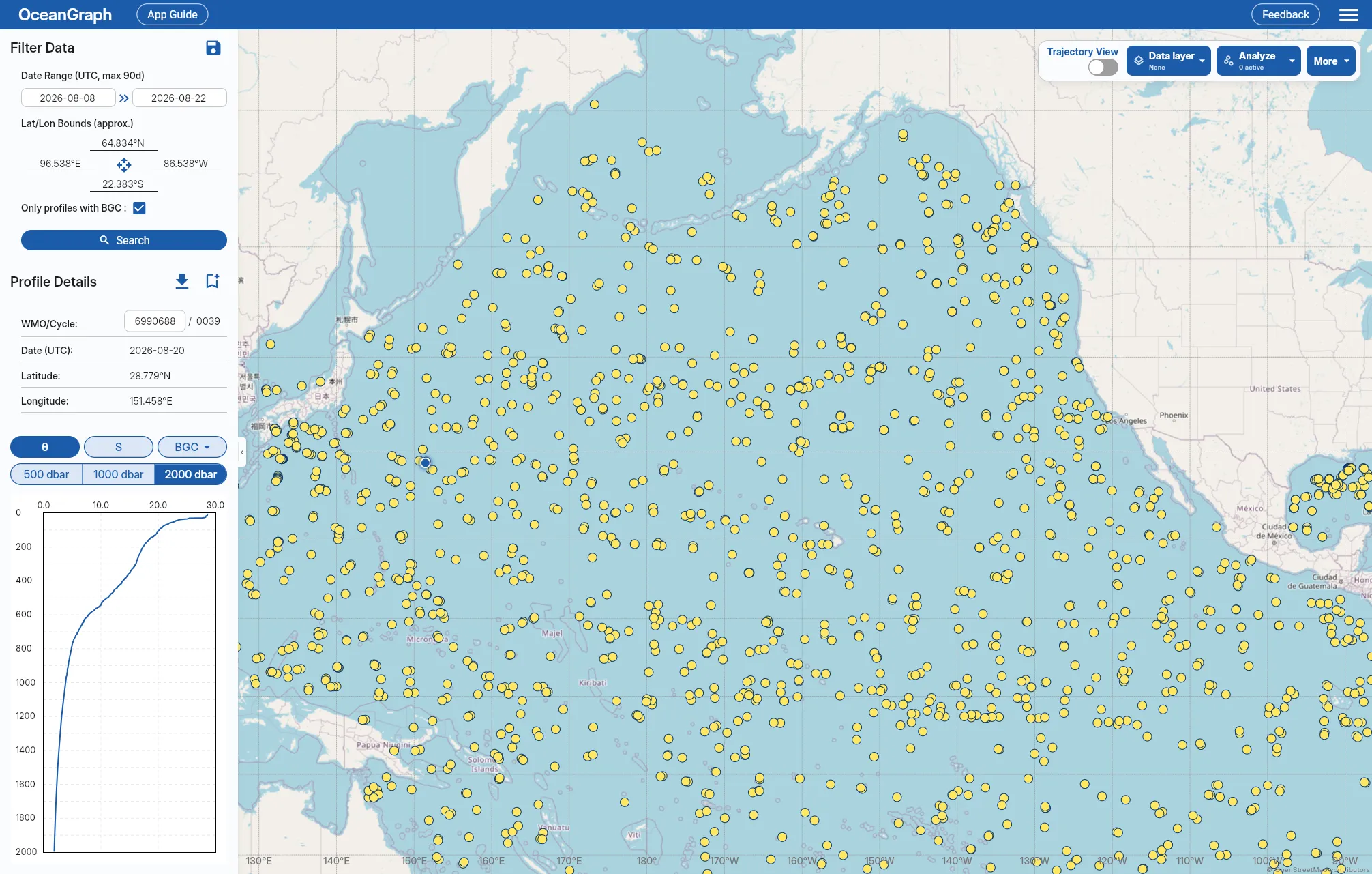
A Simple Workflow for Finding Useful Profiles
A practical beginner workflow looks like this:
- Start with a geographic area and date window if the question is regional.
- Look at the result markers before deciding which profile matters.
- Open profile details and inspect the WMO ID, cycle number, date, latitude, and longitude.
- Switch to WMO ID search if one float becomes especially relevant.
- Add the BGC filter if the question is biogeochemical.
- Bookmark the search or key profiles if you are signed in.
Date display and bookmark access work as follows:
- OceanGraph shows profile dates in UTC
- Search bookmarks and profile bookmarks are available to signed-in users
Once you have found good candidates, the next step is usually not another search. It is reading the actual profile or comparing several of them. Visualizing Argo Float Data Without Python (Step-by-Step Guide) covers that workflow.
For the file structure, see Argo NetCDF Format Explained for Beginners.
Then, once the interesting profiles are clear, you can move on to: